You copy a few paragraphs out of a PDF — a paper, a manual, a contract — and paste them. What lands looks like this:
Measurements taken over the first season con-
firm that the effect of the new calibration is
strongest at low boat speeds, where the paddle
wheel reads furthest from the GPS.
37
Above six knots the difference falls below the
resolution of the instrument, and the figures
agree within a tenth of a knot.
A PDF does not store paragraphs. It stores lines of text placed on a page, and copying hands you exactly that:
- a line break at the end of every line on the page;
- words the typesetter hyphenated at the edge of the line, like con- / firm;
- the page number, dropped in wherever the page ended;
- ligatures — ff, fi and fl stored as single characters: ff, fi, fl.
The ligatures are the sneaky part. They look right, so nothing seems wrong until a search for “effect” fails to find “effect”, or the spell checker underlines a word you know is spelled correctly.
The KlarText way
Copy the text from the PDF, then paste it with:
Edit ▸ Paste Special ▸ Paste from PDF (⌥⇧⌘V)
The same example arrives as:
Measurements taken over the first season confirm that the effect of the new calibration is strongest at low boat speeds, where the paddle wheel reads furthest from the GPS.
Above six knots the difference falls below the resolution of the instrument, and the figures agree within a tenth of a knot.- Lines inside a paragraph are joined, and a word split across two lines is rejoined — con- and firm become confirm — while a compound like well-known keeps its hyphen. KlarText decides by checking the macOS dictionary, in the language of the text you pasted.
- Page numbers are dropped. In a longer paste, a line that repeats page after page — the book title or chapter name printed at the top of every page — is removed as well.
- Ligatures (fi fl ff ffi ffl ſt st) become plain letters, and soft hyphens and invisible zero-width characters are removed, so search and spell checking work again.
- Section titles and list items stay on their own lines instead of being run into the surrounding text.
Like every paste command, it does its work on the way in: the broken version never appears in your document.
If the text is already in the document
Select it and choose Edit ▸ Transform ▸ Text ▸ Clean Up PDF Text. With nothing selected, it cleans the whole document. It is one step to undo, like any other edit.
Without opening KlarText at all
The same repair is a macOS Service, so it works on selected text in any application — a PDF open in Preview, a page in Safari, a message in Mail.
Select the text, then:
Services ▸ Clean Up PDF Text and Copy
You will find it in the application menu of whichever app you are in — Preview ▸ Services, Safari ▸ Services — or by right-clicking the selection. The cleaned text goes straight to your clipboard, ready to paste wherever it was headed.
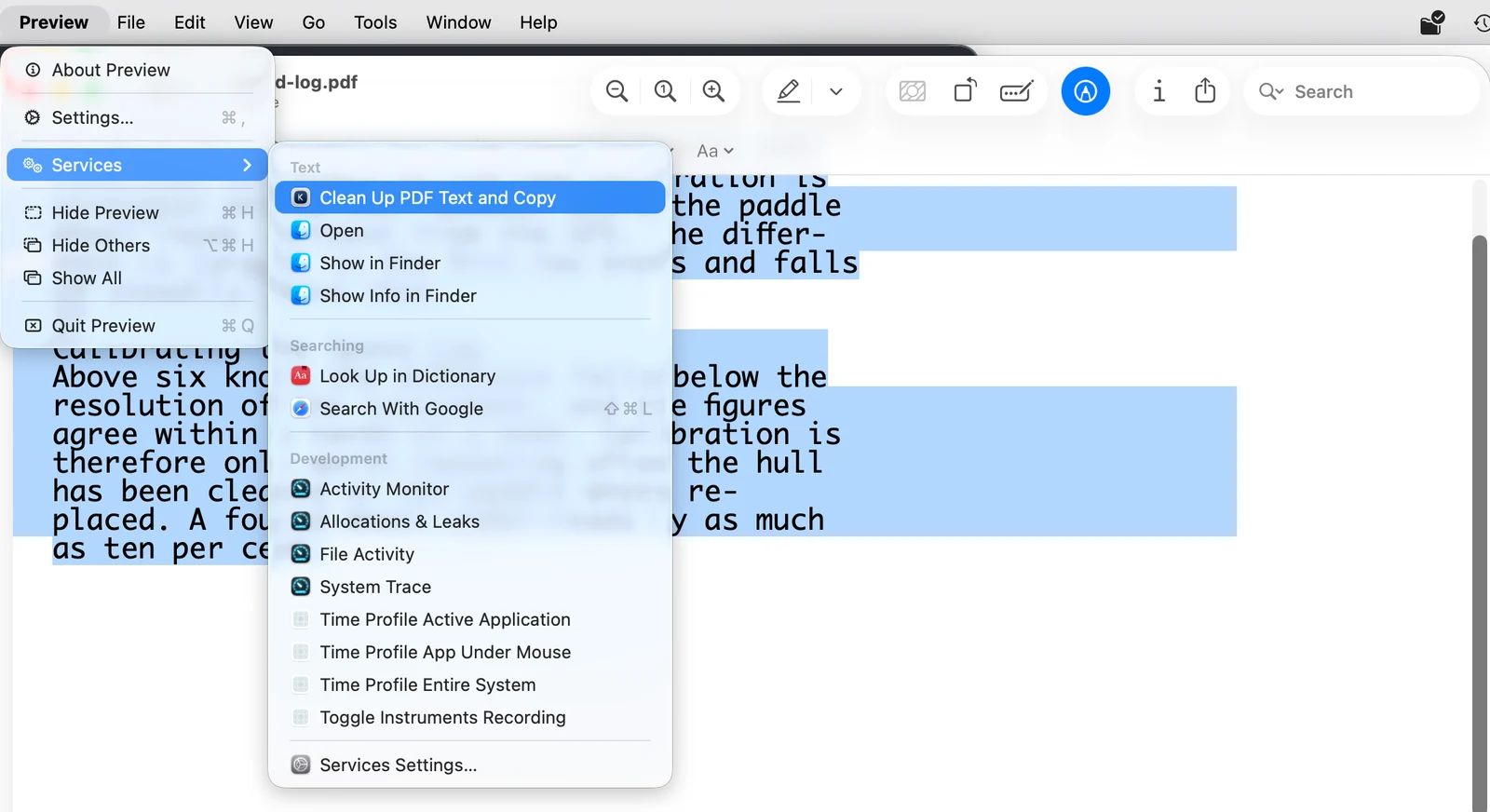
Where the text can be edited in place, Services ▸ Clean Up PDF Text replaces the selection instead. Preview offers only the Copy version, because there is nowhere inside a PDF to put the result — which is the case that matters most here.
A newly installed Service starts switched off. Turn it on once in System Settings ▸ Keyboard ▸ Keyboard Shortcuts ▸ Services, under Text, then quit and reopen the app you want to use it in — applications build their Services menu when they launch, so a running app will not show it until it restarts.
Choosing what gets cleaned
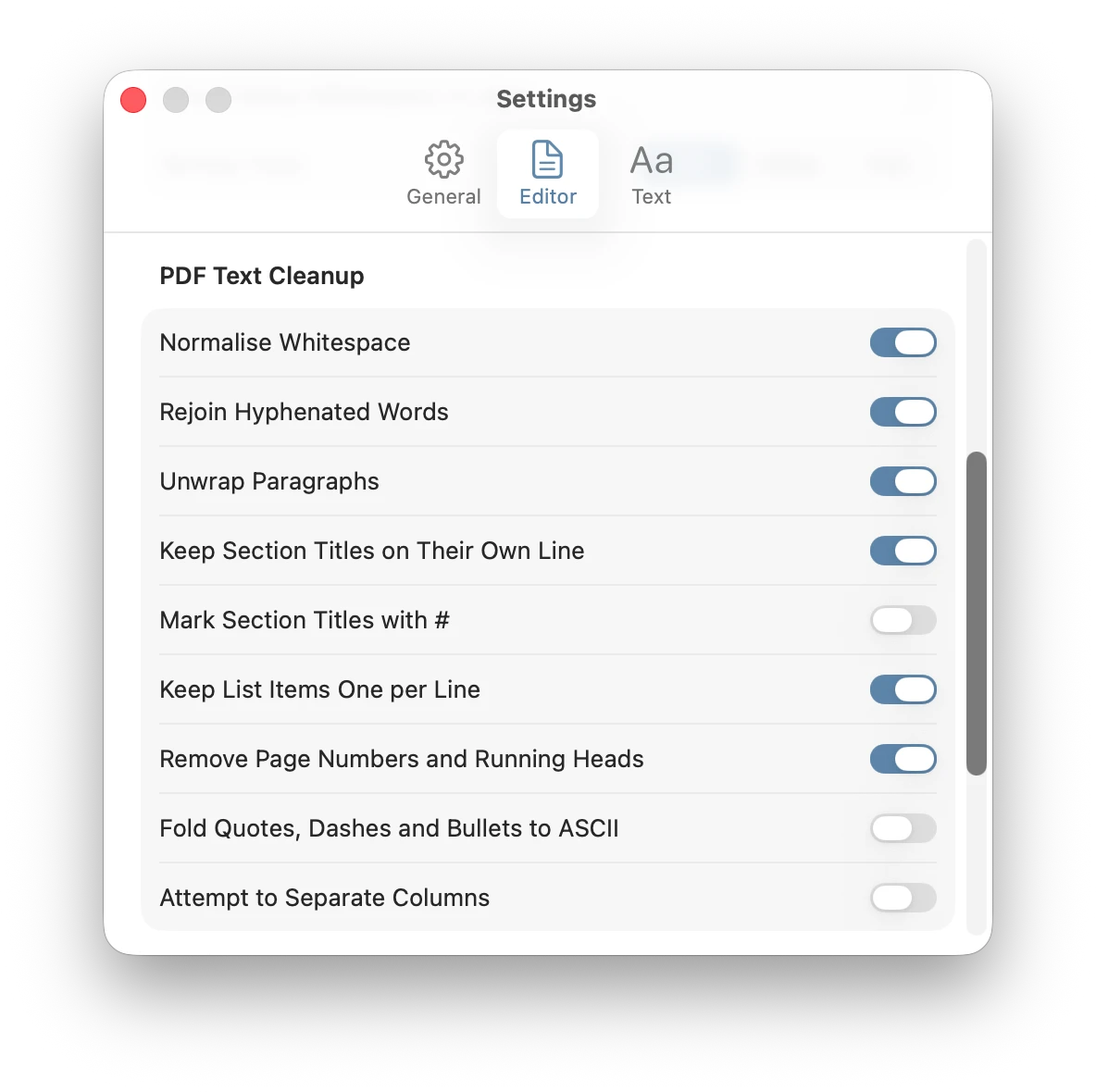
Each pass can be switched on or off in KlarText ▸ Settings ▸ PDF Cleanup. Three passes are off until you ask for them: marking section titles with # for Markdown, folding curly quotes, dashes and bullets to plain ASCII, and separating text from a two-column layout — which is always a guess, because copied text carries no information about where the columns were on the page.
Appendix: the Terminal way
pbpaste | perl -0777 -CSD -pe 's/-\n(?=\p{Ll})//g; s/\n(?!\n)/ /g' | pbcopyIf you would rather not install anything, this deletes every hyphen at the end of a line that is followed by a lowercase letter, then turns every single line break into a space. On the example above it gives:
Measurements taken over the first season confirm that the effect of the new calibration is strongest at low boat speeds, where the paddle wheel reads furthest from the GPS. 37 Above six knots the difference falls below the resolution of the instrument, and the figures agree within a tenth of a knot.The page number is now in the middle of a sentence, and the ligatures are untouched. The hyphen rule is blind, too: a compound like well-known that happened to break across two lines comes out as wellknown. And because every single line break becomes a space, headings and lists are flattened into the paragraph around them. Each of those is what the dictionary check, the page-furniture pass and the heading detection above exist for.
A related problem
Text copied from emails and mailing-list archives has the same hard line breaks without the page numbers and ligatures. For that, see how to reflow hard-wrapped text. Text from a terminal has an indent to lose as well: see how to clean up text copied from Terminal.