Syncing an Android phone to a Mac hasn’t been straightforward since Google discontinued Android File Transfer. The apps trying to fill the gap have been, in my experience, unreliable. So how do you move your music — MP3, AAC, FLAC, ALAC — from Mac to Android?
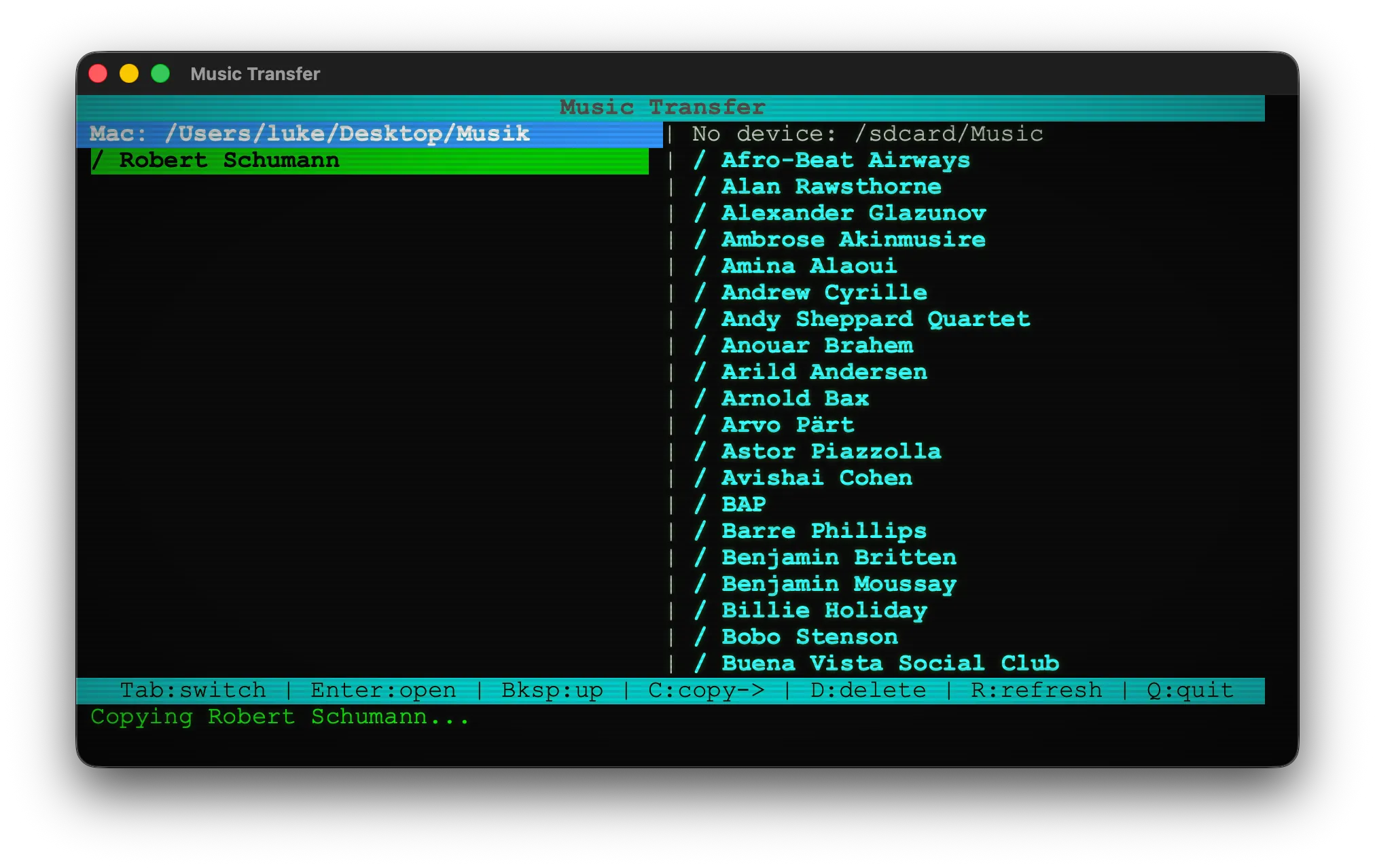
Music Transfer solves this with a dual-pane file manager in the tradition of Norton Commander, the DOS file manager that defined the paradigm in 1986. Your Mac filesystem on the left, your Android phone on the right. Tab to switch sides, arrow keys to navigate, one keypress to copy across. Files travel over USB via ADB — no cloud, no account, no Wi-Fi needed.
Under the hood, the interface is built on curses, the terminal display library whose lineage runs all the way back to the late 1970s — originally written to give programs control over the character-cell terminals of early Unix systems. The same library that powered full-screen editors on VT100 terminals now draws the dual-pane layout, the colored headers, and the status bar of Music Transfer.
The retro aesthetic isn’t an accident. An optional CRT mode wraps the terminal in a native macOS window, complete with VT323 monospace font, green-on-black phosphor glow, and scanline effects — a deliberate nod to the era when this kind of interface wasn’t nostalgia, it was the state of the art. The underlying technology is nearly fifty years old. It still works.